Friday, June 19, 2020

PySpark setup in IntelliJ idea

Introduction


This article demonstrates how to setup PySpark in Intellij Idea.

Download and Setup Intellij IDEA for PySpark


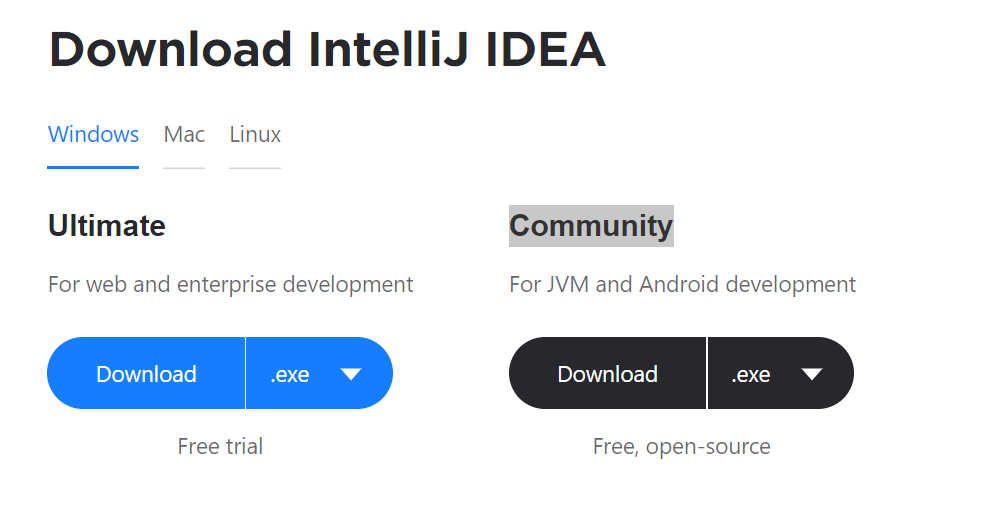
Step 1: Download Intellij Idea

You can download and install Intellij Idea from below location 
URL: https://www.jetbrains.com/idea/download/#section=windows

Step2: Prerequisite for PySpark

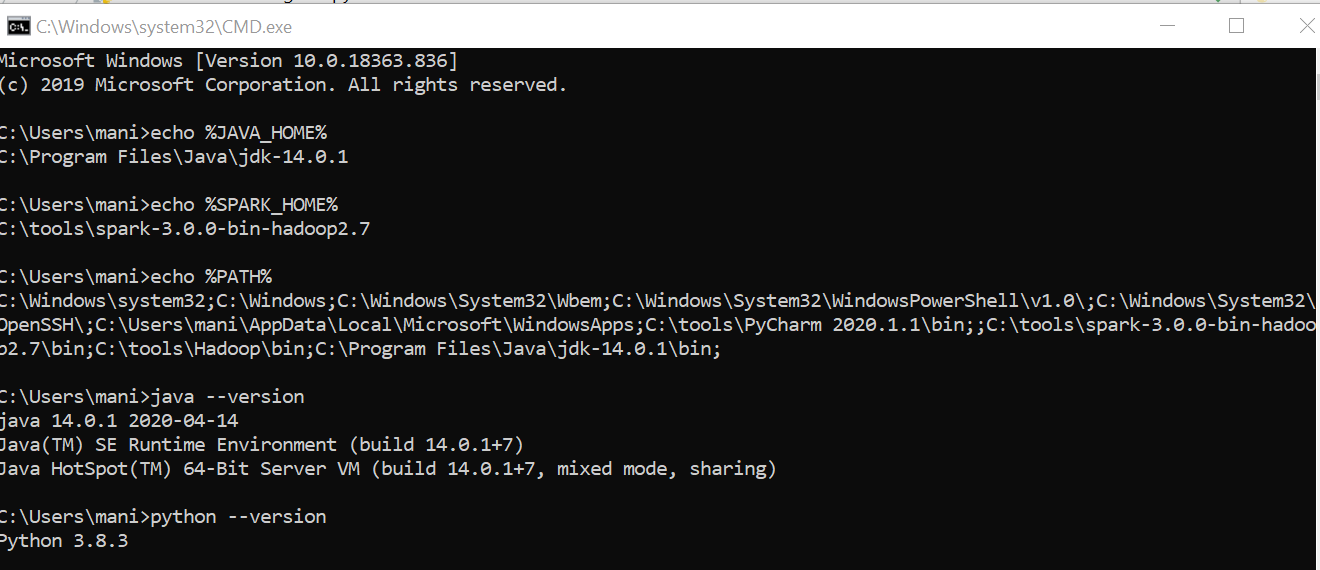
Makesure below softwares are installed and configured properly 
1. Java 2. Python 3. Spark 4. Hadoop Home for winutils.exe


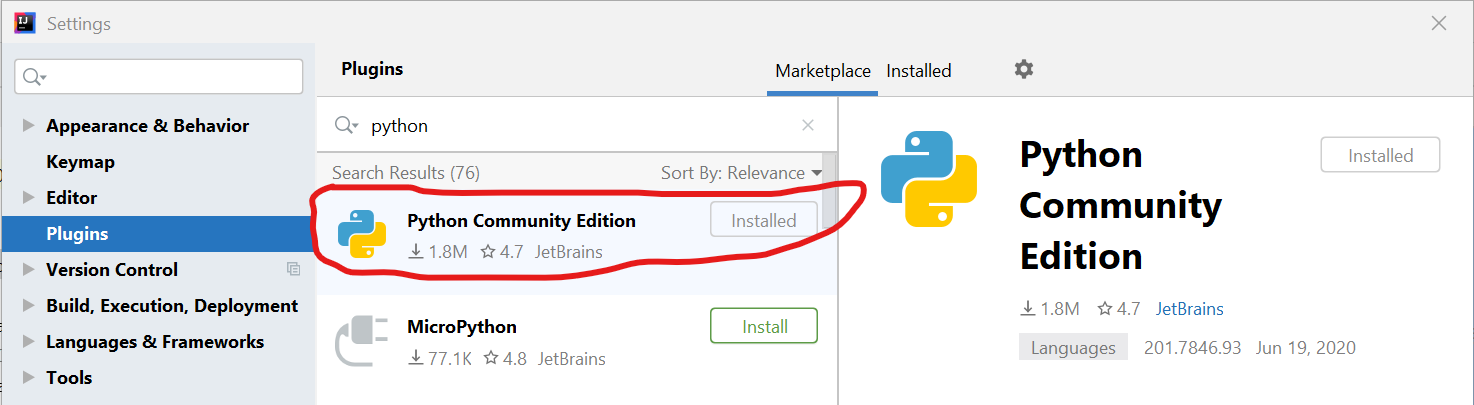
Step3: Install Python plugin in Intellij Idea


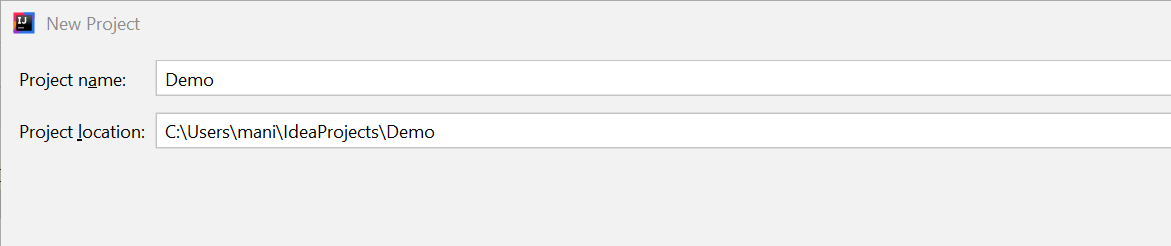
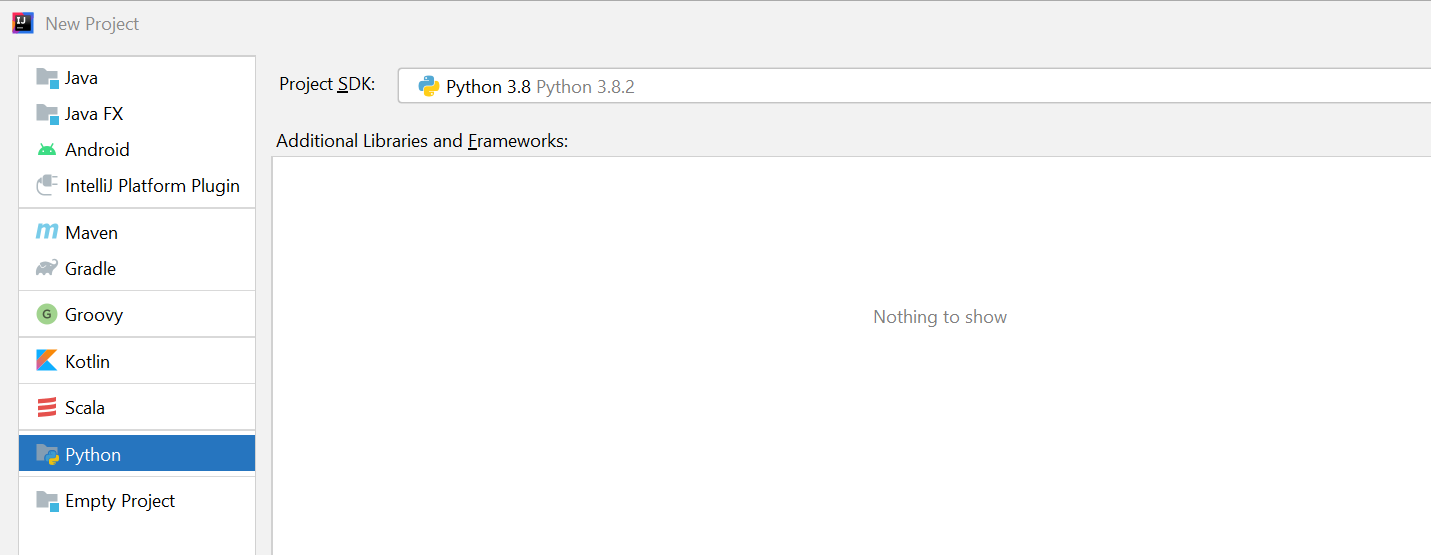
Step4: Create new Python project in Intellij Idea


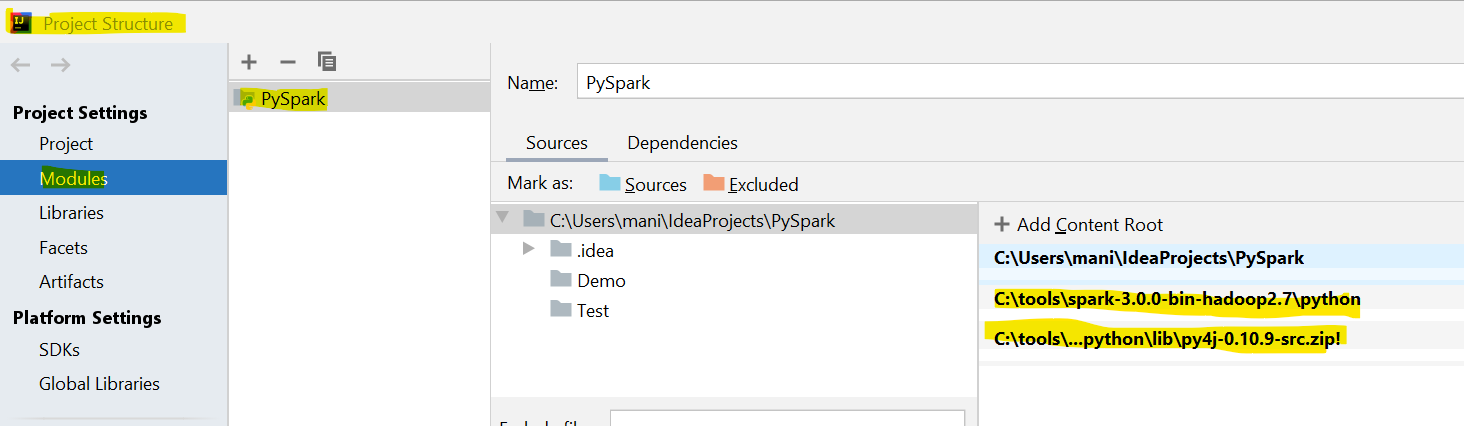
Step5: Setup PySpark required files in Project Structure


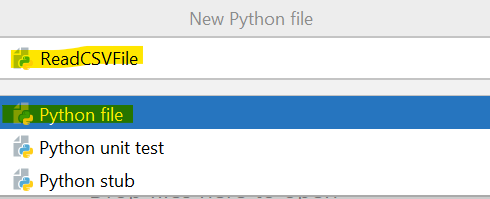
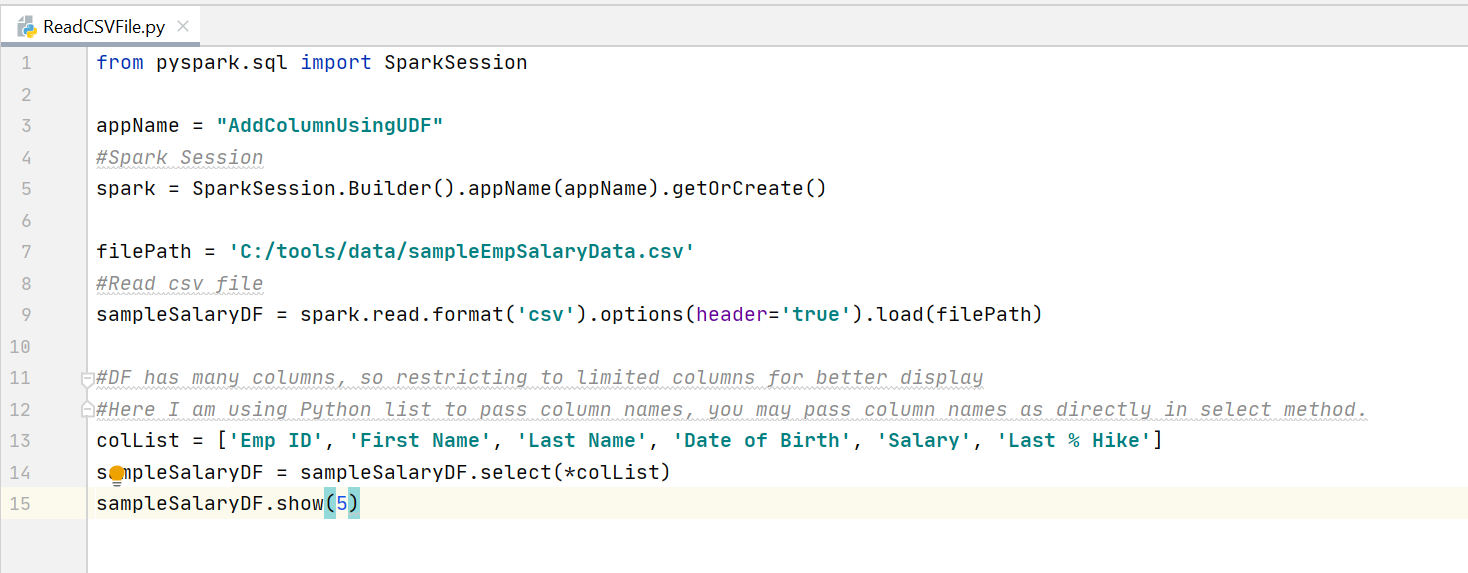
Step6: Create sample PySpark program

from pyspark.sql import SparkSession

appName = "AddColumnUsingUDF"
#Spark Session
spark = SparkSession.Builder().appName(appName).getOrCreate()

filePath = 'C:/tools/data/sampleEmpSalaryData.csv'
#Read csv file
sampleSalaryDF = spark.read.format('csv').options(header='true').load(filePath)

#DF has many columns, so restricting to limited columns for better display
#Here I am using Python list to pass column names, you may pass column names as directly in select method.
colList = ['Emp ID', 'First Name', 'Last Name', 'Date of Birth', 'Salary', 'Last % Hike']
sampleSalaryDF = sampleSalaryDF.select(*colList)
sampleSalaryDF.show(5)


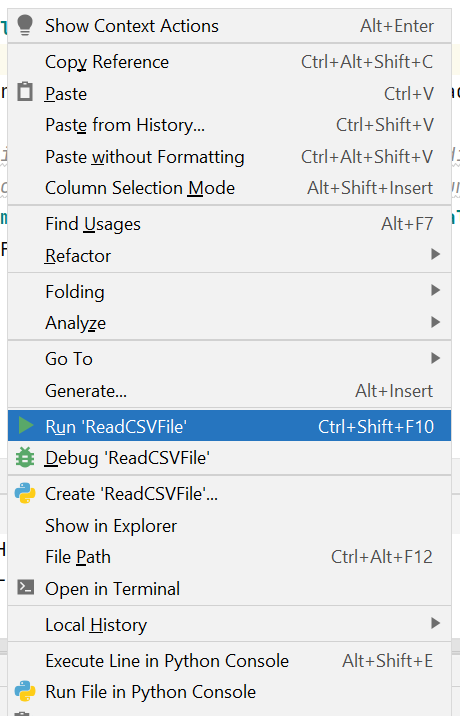
Step7: run PySpark program

This program will be executed without any issues if you configured Env property and PySpark files as specified above


Step8: Results Window

If program get executed without any issues, you can find results as like below
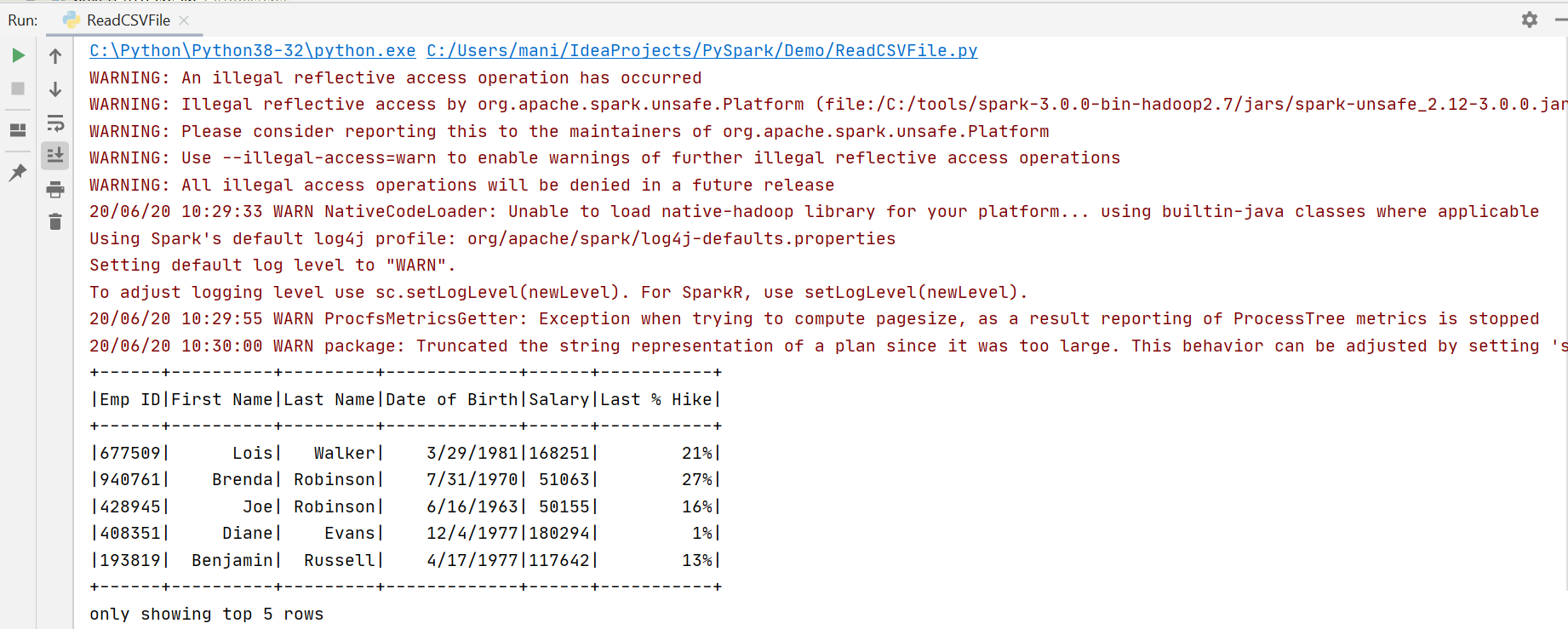


Simple Program created to read csv file, and tested its working with Intellij idea.

Sample Data: courtesy to eforexcel.com


Copyright - There is no copyright on the code. You can copy, change and distribute it freely. Just mentioning this site should be fair
(C) November 2020, manivelcode

PySpark: Add column in dataframe using UDF

Introduction


This article demonstrates how to add column in dataframe using UDF in PySpark.
The recommended rdd.map or rdd.mapPartitions for large datasets processing instead of UDF because its slow in large datasets.
You can refer this link for rdd.map and rdd.mapPartitions

Add new column in DataFrame using UDF


from pyspark.sql import SparkSession
from pyspark.sql.functions import *
from pyspark.sql.types import *

appName = "AddColumnUsingUDF"

#Spark Session
spark = SparkSession.Builder().appName(appName).getOrCreate()

filePath = 'C:/tools/data/sampleEmpSalaryData.csv'

#Read csv file
sampleSalaryDF = spark.read.format('csv').options(header='true').load(filePath)

#DF has many columns, so restricting to limited columns for better display
#Here I am using Python list to pass column names, you may pass column names as directly in select method.
colList = ['Emp ID', 'First Name', 'Last Name', 'Date of Birth', 'Salary', 'Last % Hike']
sampleSalaryDF = sampleSalaryDF.select(*colList)
sampleSalaryDF.show(5)

Output:

+------+----------+---------+-------------+------+-----------+
|Emp ID|First Name|Last Name|Date of Birth|Salary|Last % Hike|
+------+----------+---------+-------------+------+-----------+
|677509|      Lois|   Walker|    3/29/1981|168251|        21%|
|940761|    Brenda| Robinson|    7/31/1970| 51063|        27%|
|428945|       Joe| Robinson|    6/16/1963| 50155|        16%|
|408351|     Diane|    Evans|    12/4/1977|180294|         1%|
|193819|  Benjamin|  Russell|    4/17/1977|117642|        13%|
+------+----------+---------+-------------+------+-----------+

using UDF in DataFrame:

#Using UDF in DataFrame - Option 1
#Python function for UDF
def addRevisedSalaryUDF(salary, lastHike):
    lastHike = int(lastHike.replace("%", ""))
    revisedSalary = float(salary) + (float(salary) * lastHike / 100)
    return revisedSalary

#create UDF function variable to use in DataFrame
revisedSalaryUDF = udf(addRevisedSalaryUDF, FloatType())

sampleSalaryDFUpdated = sampleSalaryDF.withColumn('New Salary', revisedSalaryUDF("Salary", "Last % Hike"))
sampleSalaryDFUpdated.show(5)

Output:

+------+----------+---------+-------------+------+-----------+----------+
|Emp ID|First Name|Last Name|Date of Birth|Salary|Last % Hike|New Salary|
+------+----------+---------+-------------+------+-----------+----------+
|677509|      Lois|   Walker|    3/29/1981|168251|        21%| 203583.71|
|940761|    Brenda| Robinson|    7/31/1970| 51063|        27%|  64850.01|
|428945|       Joe| Robinson|    6/16/1963| 50155|        16%|   58179.8|
|408351|     Diane|    Evans|    12/4/1977|180294|         1%| 182096.94|
|193819|  Benjamin|  Russell|    4/17/1977|117642|        13%| 132935.46|
+------+----------+---------+-------------+------+-----------+----------+

Using UDF in Spark SQL:

#Using UDF in Spark SQL - Option 2
#Register a function as a UDF, you can optionally set the return type of your UDF
#The default return type is StringType
spark.udf.register("revisedSalary", addRevisedSalaryUDF, FloatType())

sampleSalaryDF.createOrReplaceTempView("SampleSalary")
sampleSalaryDFUpdated = spark.sql("select a.*, revisedSalary(Salary, `Last % Hike`) as `New Salary` from SampleSalary a")

sampleSalaryDFUpdated.show(5)

Output:

+------+----------+---------+-------------+------+-----------+----------+
|Emp ID|First Name|Last Name|Date of Birth|Salary|Last % Hike|New Salary|
+------+----------+---------+-------------+------+-----------+----------+
|677509|      Lois|   Walker|    3/29/1981|168251|        21%| 203583.71|
|940761|    Brenda| Robinson|    7/31/1970| 51063|        27%|  64850.01|
|428945|       Joe| Robinson|    6/16/1963| 50155|        16%|   58179.8|
|408351|     Diane|    Evans|    12/4/1977|180294|         1%| 182096.94|
|193819|  Benjamin|  Russell|    4/17/1977|117642|        13%| 132935.46|
+------+----------+---------+-------------+------+-----------+----------+


Using UDF annotation syntax


#UDF using annotation syntax - Option 3
@udf()
def addRevisedSalaryUDF(salary, lastHike):
    lastHike = int(lastHike.replace("%", ""))
    revisedSalary = float(salary) + (float(salary) * lastHike / 100)
    return revisedSalary

sampleSalaryDFUpdated = sampleSalaryDF.withColumn('New Salary', addRevisedSalaryUDF("Salary", "Last % Hike"))
sampleSalaryDFUpdated.show(5)

Output:

+------+----------+---------+-------------+------+-----------+----------+
|Emp ID|First Name|Last Name|Date of Birth|Salary|Last % Hike|New Salary|
+------+----------+---------+-------------+------+-----------+----------+
|677509|      Lois|   Walker|    3/29/1981|168251|        21%| 203583.71|
|940761|    Brenda| Robinson|    7/31/1970| 51063|        27%|  64850.01|
|428945|       Joe| Robinson|    6/16/1963| 50155|        16%|   58179.8|
|408351|     Diane|    Evans|    12/4/1977|180294|         1%| 182096.94|
|193819|  Benjamin|  Russell|    4/17/1977|117642|        13%| 132935.46|
+------+----------+---------+-------------+------+-----------+----------+


UDF is recommended for small datasets operations but not for large datasets.

Sample Data: courtesy to eforexcel.com


Copyright - There is no copyright on the code. You can copy, change and distribute it freely. Just mentioning this site should be fair
(C) November 2020, manivelcode

PySpark: Add column in dataframe using Map and Map Partitions

Introduction


This article demonstrates how to add column in dataframe using Map and Map Partitions

What is the best way to add new column to DataFrame in PySpark
Here we are going to see adding column to DataFrame using withColumn, Spark SQL and Map function.
In this scenario, not much difference between withColumn and Spark SQL, but Map create huge difference. Try to use Spark SQL wherever applicable and possible because DataFrames and Spark SQL are much more sensitive than using rdd.map
There are cases you will end up using Spark SQL UDF, during this time rdd.map will be better option for large datasets processing from my perspective If you have having better hardware you may use mapPartitions.
Let us see example on each scenario.

Traditional approach to add new column in DataFrame


from pyspark.sql import SparkSession
from pyspark.sql.functions import *

appName = "AddColumnUsingMap"

#Spark Session
spark = SparkSession.Builder().appName(appName).getOrCreate()

filePath = 'C:/tools/data/sampleEmpSalaryData.csv'

#Read csv file
sampleSalaryDF = spark.read.format('csv').options(header='true').load(filePath)

#DF has many columns, so restricting to limited columns for better display
#Here I am using Python list to pass column names, you may pass column names as directly in select method.
colList = ['Emp ID', 'First Name', 'Last Name', 'Date of Birth', 'Salary', 'Last % Hike']
sampleSalaryDF = sampleSalaryDF.select(*colList)
sampleSalaryDF.show(5)

Output:

+------+----------+---------+-------------+------+-----------+
|Emp ID|First Name|Last Name|Date of Birth|Salary|Last % Hike|
+------+----------+---------+-------------+------+-----------+
|677509|      Lois|   Walker|    3/29/1981|168251|        21%|
|940761|    Brenda| Robinson|    7/31/1970| 51063|        27%|
|428945|       Joe| Robinson|    6/16/1963| 50155|        16%|
|408351|     Diane|    Evans|    12/4/1977|180294|         1%|
|193819|  Benjamin|  Russell|    4/17/1977|117642|        13%|
+------+----------+---------+-------------+------+-----------+

withColumn:

sampleSalaryDFUpdated = sampleSalaryDF.withColumn('New Salary', expr("Salary + (Salary * int(replace(`Last % Hike`, '%', '')) / 100)"))
sampleSalaryDFUpdated.show(5)

Output:

+------+----------+---------+-------------+------+-----------+----------+
|Emp ID|First Name|Last Name|Date of Birth|Salary|Last % Hike|New Salary|
+------+----------+---------+-------------+------+-----------+----------+
|677509|      Lois|   Walker|    3/29/1981|168251|        21%| 203583.71|
|940761|    Brenda| Robinson|    7/31/1970| 51063|        27%|  64850.01|
|428945|       Joe| Robinson|    6/16/1963| 50155|        16%|   58179.8|
|408351|     Diane|    Evans|    12/4/1977|180294|         1%| 182096.94|
|193819|  Benjamin|  Russell|    4/17/1977|117642|        13%| 132935.46|
+------+----------+---------+-------------+------+-----------+----------+

SparkSQL:

sampleSalaryDF.createOrReplaceTempView("SampleSalary")
sampleSalaryDFUpdated = spark.sql("select a.*, Salary + (Salary * int(replace(`Last % Hike`, '%', '')) / 100) as `New Salary` from SampleSalary a")

Output:

+------+----------+---------+-------------+------+-----------+----------+
|Emp ID|First Name|Last Name|Date of Birth|Salary|Last % Hike|New Salary|
+------+----------+---------+-------------+------+-----------+----------+
|677509|      Lois|   Walker|    3/29/1981|168251|        21%| 203583.71|
|940761|    Brenda| Robinson|    7/31/1970| 51063|        27%|  64850.01|
|428945|       Joe| Robinson|    6/16/1963| 50155|        16%|   58179.8|
|408351|     Diane|    Evans|    12/4/1977|180294|         1%| 182096.94|
|193819|  Benjamin|  Russell|    4/17/1977|117642|        13%| 132935.46|
+------+----------+---------+-------------+------+-----------+----------+


add new column in DataFrame: using rdd.map


from pyspark.sql.types import *

#Create Python function to add new column
def addRevisedSalary(row):
    rowDict = row.asDict()
    revisedSalary = float(rowDict.get("Salary")) + \
                    (float(rowDict.get("Salary")) *
                     (int(rowDict.get("Last % Hike").replace("%", "")) / 100))
    rowDict["New Salary"] = str(revisedSalary)
    return rowDict

#Using Map
sampleSalaryUpdRDD = sampleSalaryDF.rdd.map(addRevisedSalary)

#we need to pass updated schema while creating DataFrame
inputSchema = sampleSalaryDF.schema
newSchema = inputSchema.add("New Salary", StringType())

sampleSalaryDFUpdated = spark.createDataFrame(sampleSalaryUpdRDD, newSchema)
sampleSalaryDFUpdated.show(5)

Output:

+------+----------+---------+-------------+------+-----------+----------+
|Emp ID|First Name|Last Name|Date of Birth|Salary|Last % Hike|New Salary|
+------+----------+---------+-------------+------+-----------+----------+
|677509|      Lois|   Walker|    3/29/1981|168251|        21%| 203583.71|
|940761|    Brenda| Robinson|    7/31/1970| 51063|        27%|  64850.01|
|428945|       Joe| Robinson|    6/16/1963| 50155|        16%|   58179.8|
|408351|     Diane|    Evans|    12/4/1977|180294|         1%| 182096.94|
|193819|  Benjamin|  Russell|    4/17/1977|117642|        13%| 132935.46|
+------+----------+---------+-------------+------+-----------+----------+


add new column in DataFrame: using rdd.mapPartitions


#Create Python function to add new column for map partitions 
def addRevisedSalaryUsingPartition(partition):
    for row in partition:
        rowDict = row.asDict()
        revisedSalary = float(rowDict.get("Salary")) + \
                        (float(rowDict.get("Salary")) *
                         (int(rowDict.get("Last % Hike").replace("%", "")) / 100))
        rowDict["New Salary"] = str(revisedSalary)
        yield rowDict

#Using Map Partitions 
sampleSalaryUpdRDD = sampleSalaryDF.rdd.mapPartitions(addRevisedSalaryUsingPartition)

#we need to pass updated schema while creating DataFrame
inputSchema = sampleSalaryDF.schema
newSchema = inputSchema.add("New Salary", StringType())

#Create DataFrame
sampleSalaryDFUpdated = spark.createDataFrame(sampleSalaryUpdRDD, newSchema)
sampleSalaryDFUpdated.show(5)

Output:

+------+----------+---------+-------------+------+-----------+----------+
|Emp ID|First Name|Last Name|Date of Birth|Salary|Last % Hike|New Salary|
+------+----------+---------+-------------+------+-----------+----------+
|677509|      Lois|   Walker|    3/29/1981|168251|        21%| 203583.71|
|940761|    Brenda| Robinson|    7/31/1970| 51063|        27%|  64850.01|
|428945|       Joe| Robinson|    6/16/1963| 50155|        16%|   58179.8|
|408351|     Diane|    Evans|    12/4/1977|180294|         1%| 182096.94|
|193819|  Benjamin|  Russell|    4/17/1977|117642|        13%| 132935.46|
+------+----------+---------+-------------+------+-----------+----------+


rdd.map operation gives better performance compare to udf for complex transformation in DataFrame.
rdd.mapPartitions is more efficient than rdd.map if you have good infra, not much benefit using local or single node env.
Spark SQL is recommended option for DataFrame transformations, if any complex transformation which is not possible in Spark SQL (in-build functions/expressions) then you can try using rdd.map or rdd.mapPartitions.


Copyright - There is no copyright on the code. You can copy, change and distribute it freely. Just mentioning this site should be fair
(C) November 2020, manivelcode

Sunday, November 12, 2017

Add / Modify Songs Properties using Java & Jaudiotagger library

Introduction

Here I have provided peace of code to modify songs info, like album, artist, artwork, etc using Java & Jaudiotagger library

You can download jaudiotagger library


https://bitbucket.org/ijabz/jaudiotagger/downloads/jaudiotagger-2.2.6-SNAPSHOT.jar


Assume songs folder location c:/tmp/songs

RenameSongsInfo


import java.io.File;

import org.jaudiotagger.audio.AudioFile;
import org.jaudiotagger.audio.AudioFileIO;
import org.jaudiotagger.tag.FieldKey;
import org.jaudiotagger.tag.Tag;

/*
 *This program helps to add/modify songs properties 
 */
public class RenameSongsInfo {

 public static void main(final String[] args) {
  String songLocation = "C:/tmp/songs";

  File dir = new File(songLocation);

  traverseSongsInfo(dir);

 }

 static void traverseSongsInfo(File file) {

  String folderName = "";

  if (file.isDirectory()) {
   File[] subFiles = file.listFiles();

   if (subFiles.length == 0) {
    System.out.println("The directory is empty");
   } else {
    for (File subFile: subFiles) {
     if (subFile.isDirectory()) {
      traverseSongsInfo(subFile);
     } else {
      folderName = subFile.getParentFile().getName();
      if (subFile.getAbsolutePath().contains("Elaiyaraja Hits"))
       folderName = "Elaiyaraja Hits";

      setSongAuthor(folderName, subFile);
     }
    }
   }
  }
 }

 static void setSongAuthor(String folderName, File mp3File) {

  try {

   AudioFile f = AudioFileIO.read(mp3File);
   Tag tag = f.getTagOrCreateAndSetDefault();

   if (tag == null) {
    System.out.println("tag is null");
   } else {

    tag.setField(FieldKey.ARTIST, folderName);
    tag.setField(FieldKey.ALBUM_ARTIST, folderName);

    String album = tag.getFirst(FieldKey.ALBUM);

    //Here I am removing web site name from existing album name, you can provide custom name if you want
    album = album.replace(" - TamilWire.com", "");

    tag.setField(FieldKey.ALBUM, album);

    tag.deleteArtworkField();

    f.commit();
    System.out.println("Completed - " + mp3File.getAbsolutePath());
   }
  } catch (Exception e) {
   System.err.println(e);
  }

 }

}


I have tested with jdk1.8 in windows 10.
That's it!!


Copyright - There is no copyright on the code. You can copy, change and distribute it freely. Just mentioning this site should be fair
(C) November 2017, manivelcode

Saturday, November 11, 2017

Download songs from website using Java

Introduction

If you want to download mp3/song file from website its take time and it will popup adds, to avoid that you can use below program to download songs by one shot.
Create Songs Folder Location to store in Local drive "c:/tmp/songs/";
Place urls properties file in C:/tmp/songs/

DownloadSongsFromWeb


import java.io.BufferedReader;
import java.io.File;
import java.io.FileOutputStream;
import java.io.FileReader;
import java.io.IOException;
import java.io.InputStream;
import java.io.InputStreamReader;
import java.io.OutputStream;
import java.net.MalformedURLException;
import java.net.URL;
import java.net.URLConnection;
import java.net.URLDecoder;

/** 
 * The standard class for downloading songs from given web url 
 * 
 */ 
public class DownloadSongsFromWeb {
 /*
  * Main Method
  */
 public static void main(String[] args) {

  String tgtLocation = "c:/tmp/songs/";
  String songsUrls = "C:/tmp/songs/urls.properties";

  try {
   File file = new File(songsUrls);
   FileReader fileReader = new FileReader(file);
   BufferedReader bufferedReader = new BufferedReader(fileReader);

   String line;
   while ((line = bufferedReader.readLine()) != null) {
    System.out.println("Processing : " + line);

    if (line.contains("&cpage")) {
     processSPage(line, tgtLocation);
    } else {
     getFileInfo(line, tgtLocation);
    }

    // System.out.println(line + ":Download Completed");
   }
   fileReader.close();

  } catch (IOException e) {
   e.printStackTrace();
  }

 }

 /*
  * It process the entire web url and find mp3 file or child url to get mp3 file 
  */
 private static void processSPage(String line, String tgtLocation) {
  
  try {
   URL url = new URL(line);

   URLConnection uc = url.openConnection();

   uc.addRequestProperty("User-Agent", "Mozilla/4.0 (compatible; MSIE 6.0; Windows NT 5.0)");
   uc.connect();

   BufferedReader in = new BufferedReader(new InputStreamReader(uc.getInputStream()));
   String inputLine="";

   String songsURL[];
   String songsSplitLine = "";
   String newURL = "";
   while ((inputLine = in.readLine()) != null) {

    songsURL = inputLine.split("page=ILaiyaraja Hits&");

    for (int i = 0; i < songsURL.length; i++) {
     songsSplitLine = songsURL[i];
     if (!songsSplitLine.isEmpty() && songsSplitLine.contains("spage=")) {
      
      newURL = songsSplitLine.substring(0, songsSplitLine.indexOf("\""));

      newURL = line.substring(0, line.indexOf("cpage")) + newURL;

      System.out.println(newURL);

      getFileInfo(newURL, tgtLocation);
     }
    }
   }
   in.close();

  } catch (MalformedURLException me) {
   System.out.println(me);

  } catch (IOException ioe) {
   System.out.println(ioe);
  }

 }

 /*
  * This method get the list of mp3 urls from child page and pass url to @downloadMP3 method
  */
 private static void getFileInfo(String urlPage, String tgtLocation) {

  try {
   URL url = new URL(urlPage);

   URLConnection uc = url.openConnection();

   uc.addRequestProperty("User-Agent", "Mozilla/4.0 (compatible; MSIE 6.0; Windows NT 5.0)");
   uc.connect();

   BufferedReader in = new BufferedReader(new InputStreamReader(uc.getInputStream()));
   String inputLine, songUrl = "";

   int count = 0;
   String songsURL[];
   String songsSplitLine = "";
   while ((inputLine = in.readLine()) != null) {

    songsURL = inputLine.split("href=");

    for (int i = 0; i < songsURL.length; i++) {
     songsSplitLine = songsURL[i];

     if (songsSplitLine.toUpperCase().contains(".MP3") && songsSplitLine.contains("http://")) {

      songUrl = songsSplitLine.substring(songsSplitLine.indexOf("http://"),
        songsSplitLine.indexOf(".mp3") + 4);

      downloadMP3(songUrl, tgtLocation);
     }

    }
   }
   in.close();

  } catch (MalformedURLException me) {
   System.out.println(me);

  } catch (IOException ioe) {
   System.out.println(ioe);
  }

 }

 /*
  * This method download mp3 file from give url
  */
 private static void downloadMP3(String songUrl, String tgtLocation) {
  try {
   String[] folderNames = songUrl.split("/");

   String folderName = folderNames[folderNames.length - 2];
   folderName = URLDecoder.decode(folderName, "UTF-8");

   String fileName = folderNames[folderNames.length - 1].replace("TamilWire.com", "");

   fileName = URLDecoder.decode(fileName, "UTF-8").replace(" ", "").replace("-.", ".");

   createFolder(tgtLocation + folderName);

   String tgtFile = tgtLocation + folderName + "/" + fileName;

   if (!new File(tgtFile).exists()) {

    songUrl = songUrl.replace(" ", "%20");

    URLConnection conn = new URL(songUrl).openConnection();

    conn.addRequestProperty("User-Agent", "Mozilla/4.0 (compatible; MSIE 6.0; Windows NT 5.0)");
    conn.connect();

    InputStream is = conn.getInputStream();

    OutputStream outstream = new FileOutputStream(new File(tgtFile));
    byte[] buffer = new byte[4096];
    int len;
    while ((len = is.read(buffer)) > 0) {
     outstream.write(buffer, 0, len);
    }
    outstream.close();

    System.out.println(tgtFile + " Downloaded");
   }

  } catch (Exception e) {
   System.err.println(e.getMessage());
  }

 }

 /*
  * It songs folder will be created based on url songs categorization 
  */
 private static void createFolder(String folderPath) {

  File file = new File(folderPath);
  if (!file.exists()) {
   if (file.mkdir()) {
    System.out.println("Directory is created!");
   }
  }
 }

urls.properties
You may provide multiple songs urls in properties file.


http://tamiltunes.live/vijayakanth-hits-59-tamil-songs.html
I have tested with jdk1.8 in windows 10.
That's it!!


Copyright - There is no copyright on the code. You can copy, change and distribute it freely. Just mentioning this site should be fair
(C) November 2017, manivelcode

Friday, October 21, 2011

Oracle LONG RAW

Convert LONG RAW to VARCHAR2 in Oracle


Here is the script to convert LONG RAW data to VARCHAR2.

DECLARE
   v_text   VARCHAR2 (32000) := '';
BEGIN
   FOR i IN (SELECT long_raw_column FROM long_raw_table)
   LOOP
      v_text := UTL_RAW.CAST_TO_VARCHAR2 (i.MESSAGE);

      DBMS_OUTPUT.put_line (v_text);
   END LOOP;
END;


Convert BLOB to CLOB using Java


In one of my testing I need CLOB data, but it was in BLOB, so I have used Java to convert but if any used in Oracle?.

package com;

import java.io.IOException;
import java.io.InputStreamReader;
import java.io.Reader;
import java.sql.Blob;
import java.sql.Connection;
import java.sql.PreparedStatement;
import java.sql.ResultSet;
import java.sql.SQLException;
import java.sql.Statement;

import com.util.JDBCUtil;

/**
 * The class is used to convert BLOB column values to CLOB column.
 * 
 * @author Manivel
 * @see java.sql.Blob
 */

public class ConvertBlobToClob {
 public static void main(String[] args) {
  Statement stmt;
  PreparedStatement pstmt;
  ResultSet rs;
  Connection conn;

  int messageId;
  Blob message;

  try {
   conn = JDBCUtil.getJDBCConnection();
   stmt = conn.createStatement();
   /*
    * messages : message_id is clob column
    */
   pstmt = conn.prepareStatement("INSERT INTO messages (message_id, message) VALUES (?,?)");

   /*
    * messages_blob : message is blob column
    */
   rs = stmt.executeQuery("select message_id, message from messages_blob");

   while (rs.next()) {
    messageId = rs.getInt(1);
    message = rs.getBlob(2);

    int offset = -1;
    int chunkSize = 1024;
    long blobLength = message.length();
    if (chunkSize > blobLength) {
     chunkSize = (int) blobLength;
    }
    char buffer[] = new char[chunkSize];
    StringBuilder stringBuffer = new StringBuilder();
    Reader reader = new InputStreamReader(message.getBinaryStream());

    while ((offset = reader.read(buffer)) != -1) {
     stringBuffer.append(buffer, 0, offset);
    }

    pstmt.setInt(1, messageId);
    pstmt.setString(2, stringBuffer.toString());

    pstmt.executeUpdate();

    System.out.println("Success :" + messageId);

   }

  } catch (SQLException e) {
   System.err.println(e.getMessage());
   e.printStackTrace();
  } catch (IOException e) {
   System.err.println(e.getMessage());
   e.printStackTrace();
  }
 }
}


JDBCUtil.java


package com.util;

import java.sql.Connection;
import java.sql.DriverManager;
import java.sql.SQLException;

/**
 * 
 * @author manivel
 *
 */
public class JDBCUtil {
 final static String jdbcDriver = "oracle.jdbc.driver.OracleDriver";

 /*
 private static String strHostName = "localhost";
 private static String strDBSID = "orcl";
 private static String strPortNo = "1521";
 */
 private static String strUserName = "scott";
 private static String strPassword = "tiger";
 
 
 private static String tnsName = "ORCL";
 
 private static Connection connection = null; 

 /**
  * 
  * @return
  */
 public static Connection getJDBCConnection() {
  
  try {
   if (connection == null || connection.isClosed()) {

    
    /*
      String strURL = (new StringBuilder())
      .append("jdbc:oracle:thin:@//").append(strHostName)
      .append(":").append(strPortNo).append("/")
      .append(strDBSID).toString();
    */

    String strURL = (new StringBuilder())
      .append("jdbc:oracle:oci8:@").append(tnsName).toString();
    
    Class.forName(jdbcDriver);

    connection = DriverManager.getConnection(strURL, strUserName,
      strPassword);

   }
  } catch (ClassNotFoundException e) {
   System.err.println(e.getMessage());
   e.printStackTrace();
  } catch (SQLException e) {
   System.err.println(e.getMessage());
   e.printStackTrace();
  }

  return connection;
 }
}


Copyright - There is no copyright on the code. You can copy, change and distribute it freely. Just mentioning this site should be fair

(C) August 2008, manivelcode

Find schema/user action(s) in Oracle

Find current running sql query(s) in Oracle


If you are uncertain who work around with Oracle as backend, you would face the sitution what are current sql, which is executed by whom and where.

SELECT S.USERNAME,
         S.program,
         S.machine,
         s.sid,
         s.osuser,
         t.sql_id,
         sql_text,
         s.sql_trace
    FROM v$sqltext_with_newlines t, V$SESSION s
   WHERE     t.address = s.sql_address
         AND t.hash_value = s.sql_hash_value
         AND s.status = 'ACTIVE'
ORDER BY s.sid, t.piece; 


Find invalid user object(s) in Oracle


In some time stored procedure may fail because of invalid objects, that certain we want to know the complete invalid objects lists to compile.

  SELECT OWNER,
         OBJECT_TYPE,
         OBJECT_NAME,
         STATUS
    FROM dba_objects
   WHERE STATUS = 'INVALID'
ORDER BY OWNER, OBJECT_TYPE, OBJECT_NAME;


Find last modified object(s) in Oracle


Here is the sql to find last modified objects list.

  SELECT OWNER,
         OBJECT_NAME,
         OBJECT_TYPE,
         TO_CHAR (LAST_DDL_TIME, 'MM/DD/YYYY HH24:MI:SS') last_modified,
         TO_CHAR (CREATED, 'MM/DD/YYYY HH24:MI:SS') created,
         STATUS
    FROM dba_objects
   WHERE (SYSDATE - LAST_DDL_TIME) < 1
ORDER BY LAST_DDL_TIME DESC;


Find user object notes(s) in Oracle


If you are looking out to find out the user objects counts, we need to use the following script.

SELECT USERNAME,
         COUNT (DECODE (o.TYPE#, 2, o.OBJ#, '')) Tables,
         COUNT (DECODE (o.TYPE#, 1, o.OBJ#, '')) Indexes,
         COUNT (DECODE (o.TYPE#, 5, o.OBJ#, '')) Synonyms,
         COUNT (DECODE (o.TYPE#, 4, o.OBJ#, '')) Views,
         COUNT (DECODE (o.TYPE#, 6, o.OBJ#, '')) Sequences,
         COUNT (DECODE (o.TYPE#, 7, o.OBJ#, '')) Procedures,
         COUNT (DECODE (o.TYPE#, 8, o.OBJ#, '')) Functions,
         COUNT (DECODE (o.TYPE#, 9, o.OBJ#, '')) Packages,
         COUNT (DECODE (o.TYPE#, 12, o.OBJ#, '')) Trigers,
         COUNT (DECODE (o.TYPE#, 10, o.OBJ#, '')) Dependencies
    FROM sys.obj$ o, dba_users u
   WHERE u.USER_ID = o.OWNER#(+)
GROUP BY USERNAME
ORDER BY USERNAME;


Find user privileges note(s) in Oracle


Here is the sql to find user privileges list.

  SELECT rp.GRANTEE,
         GRANTED_ROLE,
         rp.ADMIN_OPTION,
         DEFAULT_ROLE,
         PRIVILEGE
    FROM dba_role_privs rp, dba_sys_privs sp
   WHERE rp.GRANTEE = sp.GRANTEE AND rp.GRANTEE NOT IN ('SYS', 'SYSTEM', 'DBA')
ORDER BY rp.GRANTEE, GRANTED_ROLE, PRIVILEGE;


Copyright - There is no copyright on the code. You can copy, change and distribute it freely. Just mentioning this site should be fair

(C) August 2008, manivelcode

Friday, April 2, 2010

Remote debugging Tomcat with Eclipse

Remote debugging Tomcat with Eclipse


I have tried to use tomcat remote debugging using Eclipse.

To run tomcat in remote debugging you can start using below command
catalina jpda start

This (above command) will start remote debugging using shared memory, and Eclipse, as far as I know, does not support shared memory as transport for debugging.

The alternative way is to use a socket as transport for JPDA.

You simply set of some environment variable that will be checked by catalina startup script.

This tells that tomcat will use socket transport for debugging and listen on port 5050. If you don't specify the port, it will be assigned randomly.
set JPDA_TRANSPORT=dt_socket
set JPDA_ADDRESS=5050

And then start catalina.
D:\tools\apache-tomcat-6.0.18\bin>catalina jpda run
OR
D:\tools\apache-tomcat-6.0.18\bin>catalina jpda start

When tomcat started, you'll see some messages on console saying that debugging socket is listening.
C:\Tools\apache-tomcat-6.0.18\bin>catalina jpda run
Using CATALINA_BASE:   C:\Tools\apache-tomcat-6.0.18
Using CATALINA_HOME:   C:\Tools\apache-tomcat-6.0.18
Using CATALINA_TMPDIR: C:\Tools\apache-tomcat-6.0.18\temp
Using JRE_HOME:        C:\SDK\jdk
Listening for transport dt_socket at address: 5050
Apr 2, 2010 4:26:32 PM org.apache.catalina.core.AprLifecycleListener init
INFO: The APR based Apache Tomcat Native library which allows optimal performanc
e in production environments was not found on the java.library.path: C:\SDK\jdk\
bin;.;C:\WINDOWS\system32;C:\WINDOWS;"";
Apr 2, 2010 4:26:32 PM org.apache.coyote.http11.Http11Protocol init
INFO: Initializing Coyote HTTP/1.1 on http-8080
Apr 2, 2010 4:26:32 PM org.apache.catalina.startup.Catalina load
INFO: Initialization processed in 423 ms
Apr 2, 2010 4:26:32 PM org.apache.catalina.core.StandardService start
INFO: Starting service Catalina
Apr 2, 2010 4:26:32 PM org.apache.catalina.core.StandardEngine start
INFO: Starting Servlet Engine: Apache Tomcat/6.0.18
Apr 2, 2010 4:26:32 PM org.apache.coyote.http11.Http11Protocol start
INFO: Starting Coyote HTTP/1.1 on http-8080
Apr 2, 2010 4:26:33 PM org.apache.jk.common.ChannelSocket init
INFO: JK: ajp13 listening on /0.0.0.0:8009
Apr 2, 2010 4:26:33 PM org.apache.jk.server.JkMain start
INFO: Jk running ID=0 time=0/31  config=null
Apr 2, 2010 4:26:33 PM org.apache.catalina.startup.Catalina start
INFO: Server startup in 958 ms

Now it's time to connect to that socket using Eclipse:

Open eclipse, goto Run - Debug Configurations, give name, select Project, Connection Type, and give connection properties like below.


That's it!!!, Now you can do normal debugging process.

Copyright - There is no copyright on the code. You can copy, change and distribute it freely. Just mentioning this site should be fair

(C) March 2010, manivelcode